So let’s get straight to the point, because this is what most people actually want to know. How much does Windows 11 cost?
For a lot of people, it’s completely free. If you’re already using Windows 10 and your PC meets the requirements, you can upgrade to Windows 11 without paying anything at all. Yep, zero dollars.
That’s honestly one of the biggest reasons so many people switched over. Microsoft made it super easy for existing users to move forward without needing to buy anything extra.
But it really depends on your situation, and there are a few cases where you might actually need to pay.
Is Windows 1 Free ?
If you already have a legit copy of Windows 10, you’re in the best position. As long as your computer supports Windows 11, you can just upgrade through Windows Update or by download it from Microsoft website
No hidden fees, no subscriptions, nothing complicated. Just upgrade and you’re good to go.
This applies to most people who bought a Computer in the last several years. Anything relatively modern usually has a good chance of being compatible.
So if your PC checks all the boxes, you’re basically getting a free upgrade to a newer system with better features.
When You Actually Have to Pay ?
Now here’s where things change a bit.
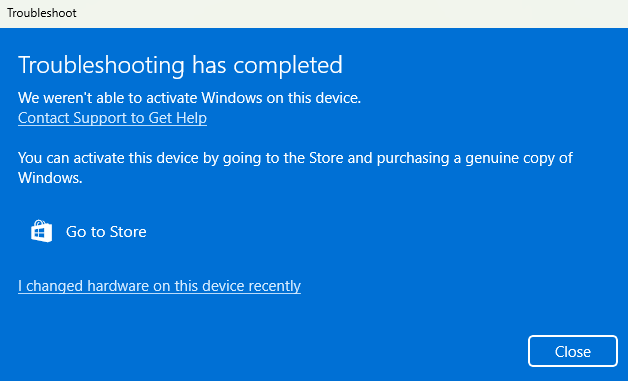
If you don’t already have Windows 10, or your copy isn’t activated, then you’ll need to buy a license key. The same goes if you’re building a new PC or installing Windows on a brand new system.
In those situations, Windows 11 isn’t free. You’ll need to purchase a product key, usually from Microsoft or an authorized retailer.
So it really comes down to this. If you’re already in the Windows ecosystem, you’re probably fine. If you’re starting from scratch, you’ll have to pay.
Why Windows 11 Even Exists ?
Before going deeper into pricing, it helps to understand what you’re actually getting.
Windows 11 is the newer version of Microsoft’s OS, released as the successor to Windows 10. It’s not just a small update either. Microsoft changed quite a bit, both visually and behind the scenes.
Think of it as a cleaner, more modern version of Windows that’s designed to feel smoother and more up to date.
What You’re Getting With Windows 11 ?
Even if the upgrade is free, it still comes with a bunch of changes and improvements that make it worth considering.
A Fresh New Design
The first thing you’ll notice is how different everything looks. The Start menu is now centered, the icons are more modern, and the overall design feels softer and cleaner.
It’s a noticeable upgrade from Windows 10, which now feels a bit outdated in comparison. It’s basically a visual refresh that makes everything look more current.
Better Features for Everyday Use
Windows 11 introduces features like Snap Layouts, which make multitasking way easier. You can quickly organize your windows without dragging them around all the time.
There are also Widgets for quick updates like weather and news, plus improved virtual desktops if you like separating different tasks or workflows.
It’s not a huge change, but it definitely makes everyday use feel smoother and more convenient.
Gaming Improvements
If you’re into gaming, Windows 11 has a few nice upgrades.
Features like AutoHDR and DirectStorage can improve visuals and reduce loading times, especially if you’re using newer hardware.
Windows 10 is still solid for gaming, but Windows 11 adds a bit more polish and future-ready features.
Stronger Security
One of the main reasons for the stricter system requirements is better security.
Windows 11 uses things like TPM 2.0 and Secure Boot to help protect your system from certain types of threats.
So while it might seem annoying that some older PCs aren’t supported, there’s actually a good reason behind it.
The Catch: System Requirements
Here’s the part that catches a lot of people off guard.
Windows 11 has stricter hardware requirements compared to Windows 10. That means some older computers simply can’t upgrade, even if they still work perfectly fine.
You’ll need a supported processor, at least 4GB of RAM, 64GB of storage, and security features like TPM 2.0.
So even if the upgrade itself is free, you might still end up spending money if your PC isn’t compatible and you need to upgrade your hardware.
Is Windows 11 Worth It?
Honestly, it depends on your situation.
If your PC supports it and you already have Windows 10, then yes, it’s definitely worth upgrading. You’re getting a newer system with better design, improved features, and stronger security without paying anything.
If your computer doesn’t support it, then it becomes more of a decision. You’ll need to think about whether upgrading your hardware is worth it just to move to Windows 11.
Also, if you’re happy with Windows 10, you don’t have to rush. It’s still supported for now, so there’s no immediate pressure to switch.
Final Thoughts
So yeah, Windows 11 can either cost nothing or something, depending on where you’re starting from.
If you’re upgrading from a legit Windows 10 setup, it’s basically a free upgrade, which is a pretty great deal.
But if you’re starting fresh or your system isn’t compatible, then you’ll need to buy a license or possibly even a new PC.
At the end of the day, the price isn’t just about money. It’s also about whether your current setup can handle it and whether the new features actually matter to you.